Sunday, 27 October 2013

Collection Framework Part-1

Introduction:

This blog is about java collection framework. We designed this post by keeping beginner and intermediate learner in mind.

Joshua Bloch
Joshua Bloch
For collection framework  you no need to add any external jar file. it's an inbuilt feature in java since JDK 1.2 release.You can find  source code of collection in rt.jar(inbuilt jar). Collection framework is also know as Java Data Structure as we can find almost all data structure implementation in this library.

The chief design and implementer of collection framework is Joshua Bloch and currently he is associated with Google a former employee of
Sun Microsystem.

As Collection  Framework is a big part so we thought of dividing it into 3 part and this is the first part.

What is Collection Framework?

In simple Collection Framework is a library to handle group of object. 

As you know java is Object Oriented. So it's a common requirement to play with object like make them in a single group based on type, Storing  them not only that after storing we need to retrieving them when ever we need and performing some basic task like searching and sorting etc. These are few most common requirement we need.

So in case of c and c++ you have to define and write your own  algorithm and logic in order to full fill the above requirement. But fortunately java is API based and everything is readily available . The only thing we need to know is, how to use it. In other word we have to know how to store and get object from Collection.

All common used collection members you'll find in java.util package.

Why Collection Framework?

 As we told this is a library to handle group of object, so definitely you may rise a question like why not object array why all the useless stuff. Of course you are right you can handle a group of object using object array but the problem with  array is
  • Array is not allowing to store dissimilar type of object in other word we can not store different class object into the same array which is frequent requirement in Java(of course you can do it using an object array but its some what lander).
  • Adding object at the end of array is easy but inserting and deleting the element in middle of the array is difficulty. In this case we have to re-arrange all the element.
  • Retrieving the element from an array is easy but after riveting the element , if we want to process them, then there are no method available to carry out this.
Due to these problem programmer want a better mechanism to store a group of object. The alternative is using an object to store a group of object. It means that we can use a class object as an array . Such an object is called as Collection Object.

Advantage of using  Collection Framework.

Collections framework is worth your effort and will benefit your programming in many ways. Below i listed few benifity
  • As it's API based(a predefined library) so no need to write your own logic to store and retrieve element, the only thing you want to do is call a predefined method to store or retrieve object.
  • It dramatically increases the readability of your collections by providing a standard set of interfaces to be used by many programmers in many applications.
  • It makes your code more flexible by allowing you to pass and return interfaces instead of concrete classes, generalizing your code rather than locking it down.
  • You can customize  searching and sorting as per your requirement.


Overview about java.util package.

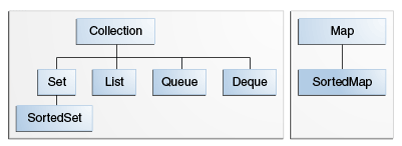
 As we already told collection framework is a library and in this library you can find a lot of common used class and interface which is inside java.util package. 
Overview about java.util package
Overview about java.util package.


The main interface of the collection framework is java.util.Collection. Here I am assuming that you are strong in java interface. java.util.Collection internally extends another interface known as java.lang.Iterable. 

By implementing/extend Iterable interface an object can take the advantage of "foreach" statement, we'll discuss about it in next heading.

So all classes and intefaces comming under java.util , we can brodly catagories inot two part
  • Collection by value(java.util.List, java.util.Set and implementation Classes)
  • Collection by key and value pair (java.util.Map and implementation Classes)

 Collection by value:

Using this type of collection we can  store only value and basically it's index based like Array.

Under this java.util.List, java.util.Set and Java.util.Queue. All 3 are interface are directly extending Java.util.Collection. All other classes and interfaces of java.util capable to store value will come under these parent interfaces.

Collection by key and value pair:

Using this type of collection we can store value corresponding to a key where key will be unique and not null.

Under this java.util.Map(an interface) will come which isn't a chile of java.util.Collection Interface and it is a parent interface for key value pair of collections.In other word  all other classes/interfaces capable to store key and value will come under Map interface.

Package Hierarchy for Java Collection Framework


How to store and retrieve from Collection.

 To store element in a collection several predefined method are there and it depends upon which collection you are using. In case of set and list add() method  whereas in case of map put() method.

Similarly to retrieve element we have get(int index) method for value pair and get(Object key) for key value pair.But using this mechanism you can retrieve a specific element you can't retrieve all the element.To retrieving all element  you have to user following ways.

In general there are 4 different way to retrieving elements form collections
  • For-each loop.
  • Iterator interface.
  • ListIterator interface.
  • Enumeration interface.
  • For loop(not a wise solutions)

For-each loop :

For-each loop is live for loop which repeatedly executes a group of statement for each element of the collection.Unlike for loop you no need to give any interment or end limit.
Syntax:

for(Variable : Collection-object)
{
      Statement
}

Iterator interface:

Iterator is an interface that contains method to retrieve elements one bu one from a collection object.It has 3 method.
  • boolean hasNext() - This method returns true if the iterator has more elements.
  • element next()- This method returns the next element in the iterator.
  • void remove()- This method will remove the last element return by the iterator from the collection. 

ListIterator interface:

ListIterator is an interface that contains method to retrieve elements from a collection object both in forward and reverse direction.It has many method but below we listed few important methods
  • boolean hasNext() - This method returns true if the ListIterator has more elements while traversing in forward direction.
  • boolean hasPrevious() - This method returns true if the ListIterator has more elements while traversing in reverse direction.
  • element next()- This method returns the next element in the iterator.
  • element previous()- This method returns the previous element in the iterator.
  • void remove()- This method will remove the last element return by the next or  previous method .

Enumeration interface:

The functionality of this Enumeration interface is duplicated by the Iterator interface. In addition, Iterator adds an optional remove operation, and has shorter method names. New implementations should consider using Iterator in preference to Enumeration.

It has two method
  • boolean hadMoreElements()- This method returns true if the iterator has more elements.
  • element nextElement()- This method returns the next element in the Enumeration.

 For loop:

For loop is as usual.


How to work with java.util.List. 

List is an interface which will allow you to store collection of value.The followings are list of classes which implements List.

Interface List<E>

E - the type of elements maintained by this List

All Known Superinterfaces:

Collection<E>, Iterable<E> 

All Known Implementing Classes:

AbstractList, AbstractSequentialList, ArrayList, AttributeList, CopyOnWriteArrayList, LinkedList, RoleList, RoleUnresolvedList, Stack, Vector.

Properties of List:

  • An ordered collection (also known as a sequence). The user of this interface has precise control over where in the list each element is inserted. The user can access elements by their integer index (position in the list), and search for elements in the list.
  • Unlike sets, lists typically allow duplicate elements. More formally, lists typically allow pairs of elements e1 and e2 such that e1.equals(e2), and they typically allow multiple null elements if they allow null elements at all.

An overview about different  methods of List:

The List interface provides following method to insert element/Object
  1. add(E e): Appends the specified element to the end of this list (optional operation).
  2. add(int index, E element): Inserts the specified element at the specified position in this list (optional operation).
  3. addAll(Collection<? extends E> c): Appends all of the elements in the specified collection to the end of this list, in the order that they are returned by the specified collection's iterator (optional operation).
  4. addAll(int index, Collection<? extends E> c): Inserts all of the elements in the specified collection into this list at the specified position (optional operation).
The List interface provides following methods to access  list elements
  1. get(int index): Returns the element at the specified position in this list.
  2. iterator(): Returns an iterator over the elements in this list in proper sequence.
  3. listIterator(): Returns a list iterator over the elements in this list (in proper sequence).
The List interface provides two methods to search for a specified object.
  1.  indexOf(Object o):Returns the index of the first occurrence of the specified element in this list, or -1 if this list does not contain the element.
  2. lastIndexOf(Object o): Returns the index of the last occurrence of the specified element in this list, or -1 if this list does not contain the element.
 The List interface provides following method to remove element/Object
  1. remove(int index): Removes the element at the specified position in this list (optional operation).
  2. remove(Object o):Removes the first occurrence of the specified element from this list, if it is present (optional operation).
  3. removeAll(Collection<?> c):Removes from this list all of its elements that are contained in the specified collection (optional operation).
  4. retainAll(Collection<?> c)Retains only the elements in this list that are contained in the specified collection (optional operation).
Other Methods.
  1. isEmpty(): Returns true if this list contains no elements.
  2. contains(Object o): Returns true if this list contains the specified element.
  3. clear(): Removes all of the elements from this list (optional operation).
  4. size(): Returns the number of elements in this list.

Examples:

Source code: http://ideone.com/cgNBex
List Demo
How to use List
 Source code: http://ideone.com/p0uGMk
Common operation on List
Common Operation With List


How to work with java.util.Set.

Set is an interface which is allowing to store collection of unique value. The followings are list of classes which implements Set

General deceleration: Interface Set<E>
E - the type of elements maintained by this set 

All Known Subinterfaces: NavigableSet<E>, SortedSet<E>

All Known Superinterfaces: Collection<E>, Iterable<E>

All Known Implementing Classes: AbstractSet, ConcurrentSkipListSet, CopyOnWriteArraySet, EnumSet, HashSet, JobStateReasons, LinkedHashSet, TreeSet

Properties of Set:

  • A collection that contains no duplicate elements. More formally, sets contain no pair of elements e1 and e2 such that e1.equals(e2), and at most one null element. As implied by its name, this interface models the mathematical set abstraction.
  • Some set implementations have restrictions on the elements that they may contain. For example, some implementations prohibit null elements, and some have restrictions on the types of their elements. 

An overview about different  methods of Set:

The Set interface provides following method to insert element/Object
  1. add(E e): Adds the specified element to this set if it is not already present (optional operation).
  2. addAll(Collection<? extends E> c): Adds all of the elements in the specified collection to this set if they're not already present (optional operation).
  3.  
The Set interface provides following methods to access  list elements
  1. iterator(): Returns an iterator over the elements in this set. 
The Set interface provides following method to remove element/Object
  1. remove(Object o): Removes the specified element from this set if it is present (optional operation).
  2. removeAll(Collection<?> c): Removes from this set all of its elements that are contained in the specified collection (optional operation).
Other Methods.
  1.  retainAll(Collection<?> c):Retains only the elements in this set that are contained in the specified collection (optional operation).
  2. size(): Returns the number of elements in this set (its cardinality).
  3. clear(): Removes all of the elements from this set (optional operation).
  4. contains(Object o): Returns true if this set contains the specified element.
  5. isEmpty(): Returns true if this set contains no elements.

Examples:

How to use Set
How to use Set
Common operation on Set


How to work with java.util.Map. 

Map is an interface which will allow us to store in key and value pair.The followings are list of classes which implements Map.
General deceleration: public interface Map<K,V>
K - the type of keys maintained by this map.
V - the type of mapped values .

All Known Subinterfaces: Bindings, ConcurrentMap<K,V>, ConcurrentNavigableMap<K,V>, LogicalMessageContext, MessageContext, NavigableMap<K,V>, SOAPMessageContext, SortedMap<K,V>

All Known Implementing Classes: AbstractMap, Attributes, AuthProvider, ConcurrentHashMap, ConcurrentSkipListMap, EnumMap, HashMap, Hashtable, IdentityHashMap, LinkedHashMap, PrinterStateReasons, Properties, Provider, RenderingHints, SimpleBindings, TabularDataSupport, TreeMap, UIDefaults, WeakHashMap 

Properties of Map:

  • Map is an collection object that maps keys to values. A map cannot contain duplicate keys; each key can map to at most one value.
  • This interface takes the place of the Dictionary class, which was a totally abstract class rather than an interface.
  • The Map interface provides three collection views, which allow a map's contents to be viewed as a set of keys, collection of values, or set of key-value mappings.
  • The order of a map is defined as the order in which the iterators on the map's collection views return their elements. Some map implementations, like the TreeMap class, make specific guarantees as to their order; others, like the HashMap class, do not.
  • Some map implementations have restrictions on the keys and values they may contain. For example, some implementations prohibit null keys and values, and some have restrictions on the types of their keys.

An overview about different  methods of Map:

 The Map interface provides following method to insert element/Object
  1. put(K key, V value): Associates the specified value with the specified key in this map (optional operation).
  2. putAll(Map<? extends K,? extends V> m): Copies all of the mappings from the specified map to this map (optional operation).
The Set interface provides following methods to access  list elements
  1. entrySet(): Returns a Set view of the mappings contained in this map.
  2. keySet(): Returns a Set view of the keys contained in this map.
  3. values(): Returns a Collection view of the values contained in this map.
 The Set interface provides following method to remove element/Object
  1. remove(Object key)Removes the mapping for a key from this map if it is present (optional operation).
 Other Methods:
  1. containsKey(Object key): Returns true if this map contains a mapping for the specified key.
  2. containsValue(Object value): Returns true if this map maps one or more keys to the specified value.
  3. isEmpty(): Returns true if this map contains no key-value mappings.
  4. int    size(): Returns the number of key-value mappings in this map.

Examples:

Different way of iterating a Map
Common Operation With Map


Which collection is the best for your Requirement. 


What to use when
What to use when

Assignment for you!!!(Comment Your Answers)

  1. Why do we need iterator, ListIterator,  Enumeration even though for loop is there. We can user add() remove() etc to do all common operation with collections?
  2. How does the following two line differs:                                                                                  >>ArrayList<String> bird = new ArrayList<String>();
            >>List<String>  bird  = new ArrayList<String>();
  3. What is the new feature added in JDK 1.7 w.r.t collection deceleration and initialization.
  4. How to  get a specific element form a Set e.g in case of  List we are using get(...)?
  5. Why Set doesn't have any method to get the element by index?
  6. Is it possible to use listIterator w.r.t Set. yes or no answer with reason?
  7. How ArralyList is differs from Vector?
  8. How HashMap is differs from HashTable.


Reference:


Saturday, 19 January 2013

CRM Terminology


Are you searching for  getting few domain knowledge about CRM?
If yes then this is the right blog you choose, hope you will like it.

==========================================================


what exactly CRM is?

  • CRM is nothing but customer relationship management basically by sales department of the Organisation in order to do business for maximising the benefit
  • And CRM software are the application software which helps to automate the sales department work. 
Examples:


Customer:

  • Customer is a person or organisation that buys goods or services from a store or other business.
  • CRM system will help to maintain the relationship with customer in order to maximise your benefits by automating maximum sales flow

Leads:

  • Leads are the individual or representative of organisation who shows interest in your product or services
  • Or in other word leads are the potential customers self registered online.

Deals:

  • Deals are the qualified/selected customer contacted by the sales team.
  • by the way the dictionary mining of deal is "An agreement entered into by two or more parties for their mutual benefit, esp. in a business or political context."

Opportunity/Potentials:

  • Opportunities are the hot Leads from where the Organisation can get more revenue by converting them into Deals.
  • Or you can say Opportunities are the sales and pending deals that you want to track; may be for making deal with them.
  • Potentials are the business deals with organisation or peoples that generates revenue for your  organisation.

Cases:

  • Cases are the feedback that are received from the customer on various issue by using your product or services.

Activities:

  • Activities are the process to keep track of business interaction including task(eg. phone call or email)  and calendar events (eg presentation or business meetings).

Task:

  • Task is an activity which is having due date.

Events:

  • Event is an activity which is having start and end time.

Contacts:

  • Contacts are the peoples in the company with whom you communicate and interact in pursuit of a business.

Accounts:

  • Accounts are companies or department in a company, with which you make business dealings.

Forecasts:

  • Forecasts are nothing but the predict and plan your sales cycle from pipeline to close sales and manage sales expectation  throughout your organisation

Campaigns:

  • A campaigns is a marketing effort to increase  the sales through planned, executed, distributed and analysed marketing activity.
  • The Goal of the effort is to often generate new Leads and help converting them to Deal.
  • A campaigns may have other goal like to awareness and brand to the company.
  • A CRM system can help for manage, execute and monitor marketing campaigns.

Products:

  • A product is a business offering form a business to it’s customer.
  • A CRM system should allows a business to record it’s product and related information so sales staff and other CRM users can use product information fully and correctly in their business activity.

Vendors:

  • Vendors are the companies, individuals or contractors from whom your organisation gets products/services.

Invoice:

  • Invoice are the bills generated by the vendor along with the goods/services with the purpose of procuring payments.
  • Or in a more general way you can say a commercial document issued by a seller to the buyer

Purchase Order:

  • Purchase Orders are legally bound order-placing documents for procuring products or services from vendors.

Price Book:

  • Price Books are the agreed price for selling a product to a customer. Based on the agreed terms, the prices can even vary for different customers.

Skype Me™!

Wednesday, 24 October 2012

Develop cool apps in Facebook

Overview:

Stop using others app on Facebook!!! This is the right time to develop your own app in Facebook, "the largest social networking media" so that others can get service from  your app as till  now you are getting it from other developers.
Facebook give the facility to take the data by user permission so that the developers can use it for their app development.
From Facebook you can access data like your birthday,your email id,you and yours friends education detail,you and yours friends work history ,your and yours friends status and photo updates and so on..(Click hear for Details).
After receiving the data from user, you can use any computer programming language to develop the app viz java. php, cpp,.Net etc.

Here i get only basic permission details, for more browse on Facebook Developer  page.You can get like button you can also get post and feeds automatically.check it out for more....

Supporting Example:

1> Recruitment:
 >>Last time i visited to vmware careers.Actually i was interested for one of the job post. so when i click apply now they redirect me towards Facebook.What they are doing is, they are tracking all the details like your email,name,dob,Education details,Work history from  Facebook account and maintaining in their own data store.If you are looking suitable for that job then  you will get a mail from their automated system.you can do it by using java mail api in-case of java or any other api in other platform.
>>Similarly i experience  the same with ZOHO career and approximately all mnc and mulit port companies are collecting data from Facebook(first one is Linked in) for their hiring process as you know Facebook is the largest social networking media.
2>Utility/security
For example to check whether all  posted link are trusted or not Norton security develop one facebook app.It will scan all link posted by your friends and detect the status etc
3>Shopping(AmeriCommerce Store)
4>Advertising(Facebook advertise )
6>Sex and Romance etc
To know more about category of app that you can develop go to

How to Prepare yourself for developing your own app:

1.You have to strong in one or  more programming language
2.You have to get one Idea on which domain exactly you want to develop your app
3.You have to have knowledge of parsing and preparing the json .

Put your First Step:

1. Register your self in Facebook Developer page with your existing credential.

2.Verify your account by using your mobile number(100% confidential)

3.click on create app(Here)

4.As soon you click on create app one pop-up will come, which will ask  App name that you wanted to     develop and App namespace which is optional one

5.Important!!!Decide on which server you will host your application, if you don't have plan then check the web Hosting box.
with this hosting server you can deploy only php, Ruby, Python, Node.js etc.If you are planning to develop your app in any other language like java,.Net,cpp etc then choose your own hosting server viz Cloud computing environment.In my case i use Google cloud.
6.Note down the app id,App secrete which you will use it on your app development


Getting start with my application:

In order to complete the blog i display user details from basic permissions only infect you can use more by following the above guide line.

Basically i did it by using java(spring, jsp, GAE, json, oauth protocol).
i use spring-mvc and for injection dependency you can use ioc.
in my app total 4 files are there;-
   1.BasicFacebookApp.java(I implimanted my business logic hear using Spring-mvc)
   2.UserDetails.java(it is one of the data transfer object you can say a pojo)
   3.userdetails.jsp(for displaying the details)
   4.welcome.jsp(user will get it in first hit)


Explanation and Details:

Here i just present few line of code snippet from my application but not the total application,So try to customize it according to you r requirement.
By using this example code you can fetch your details like mail,dob, first name, last name etc

step-1:redirect to Facebook using following URL
url=https://www.facebook.com/dialog/oauth/?" +
"client_id=copy your app id&" +
"redirect_uri=copy your redirect uri&" +
"response_type=code&" +
"state=litu101&"+
"scope=mention details permission separated with ,

Stpe-2:Get the code send by facebook as a query string
Step-3:By using the code send the url to get access_token
String url_For_AccesToken= "https://graph.facebook.com/oauth/access_token?client_id=COPY THE APP ID&" +
            "redirect_uri=http://facebookoauthforbasicinformati.appspot.com/gettingCode&" +
            "client_secret=COPY THE APP SECRATE&" +
            "code="+code;
Step-4: Exchange  the access_Token  to access Graph-api which will return the required details in the form of  json. For this you have to prepare one URL and send it to Facebook server with access_token
To prepare the URL refer to Graph API Explorer
Step-5: Parse the json using json parser 

BasicFacebookApp.java
======================================
package com.acti.controller;

import ...;

@Controller
public class BasicFacebookApp {
//this is hte welcome file
@RequestMapping(value="/", method=RequestMethod.GET)
public String homeController(){
return "welcome";
}
//Step-1
//this is the rediracted uri if user will allow then it will access data otherwise not
@RequestMapping(value="/sendfb",method=RequestMethod.GET)
public void rediredttoFacebook(HttpServletRequest request,HttpServletResponse response) throws IOException{
HttpSession session=request.getSession(true);
String redirest_Facebool="https://www.facebook.com/dialog/oauth/?" +
"client_id=copy your app id&" +
"redirect_uri=copy your redirect uri&" +
"response_type=code&" +
"state=litu101&"+
"scope=mention details permission separated with ,";
response.sendRedirect(redirest_Facebool);
}
//callback functionality
@RequestMapping(value="/gettingCode",method=RequestMethod.GET)
public String postProcessingfb(HttpServletRequest request){
HttpSession session=request.getSession(false);
if(session!=null){
UserDetails user=new UserDetails();
//step-2
String fb_code=request.getParameter("code");
String accessToken="";
System.out.println("code::"+fb_code);
//http://facebookoauthforbasicinformati.appspot.com
//http://localhost:8888/gettingCode
try {
//step-3
        String inputLine;
        String url_For_AccesToken= "https://graph.facebook.com/oauth/access_token?client_id=COPY THE APP ID&" +
            "redirect_uri=http://facebookoauthforbasicinformati.appspot.com/gettingCode&" +
            "client_secret=COPY THE APP SECRATE&" +
            "code="+fb_code;
            URL url=new URL(url_For_AccesToken);
            HttpURLConnection connection=(HttpURLConnection)url.openConnection();
            BufferedReader bufferReader=new BufferedReader(new InputStreamReader(connection.getInputStream()));
            StringBuffer stringBuffer=new StringBuffer();
            while ((inputLine=bufferReader.readLine())!=null)
            stringBuffer=stringBuffer.append(inputLine+"\n");
            bufferReader.close();
            accessToken=stringBuffer.toString();
        }catch (Exception token_Exception) {
// TODO: handle exception
        //your reeor handling code
}
        System.out.println("acces token::"+accessToken);
//step-4
        String graph = "";
        try{
        String graph_Inputline;
        String graph_requestURL="https://graph.facebook.com/me?fields=id,name,link,gender,first_name,last_name,username,locale&"+accessToken;
        URL graph_URL=new URL(graph_requestURL);
        URLConnection graph_urlConnection=graph_URL.openConnection();
        BufferedReader graph_bufferReader=new BufferedReader(new InputStreamReader(graph_urlConnection.getInputStream()));
            //StringBuffer graph_stringBuffer=new StringBuffer();
        String graph_stringBuffer = "";
            while ((graph_Inputline = graph_bufferReader.readLine()) != null)
                //graph_stringBuffer.append(graph_Inputline + "\n");
            graph+=graph_Inputline;
            graph_bufferReader.close();
            //graph=graph_bufferReader.toString();
        }catch (Exception graph_Exception) {
// TODO: handle exception
        your erroe handling code
}
        System.out.println("json::"+graph);
//step-5:
        //prese the json
        try{
        JSONObject json=new JSONObject(graph);
        user.setId(json.getString("id"));
       
        user.setName(json.getString("name"));
       
        user.setLink(json.getString("link"));
       
        user.setGender(json.getString("gender"));
       
        user.setFirst_name(json.getString("first_name"));
       
        user.setLast_name(json.getString("last_name"));
       
        user.setUsername(json.getString("username"));
       
        user.setLocale(json.getString("locale"));
       
        session.setAttribute("user",user);
        return "userdetails";
       
        }catch (Exception e) {
// TODO: handle exception
        //your own error handling code
}
}
return null;
}
}

======================================

.UserDetails.java
===========================
package com.acti.dto;

import java.io.Serializable;

@SuppressWarnings("serial")
public class UserDetails implements Serializable{
private String id;
private String name;
private String first_name;
private String last_name;
private String link;
private String username;
private String gender;
private String locale;
public String getId() {
return id;
}
public void setId(String id) {
this.id = id;
}
public String getName() {
return name;
}
public void setName(String name) {
this.name = name;
}
public String getFirst_name() {
return first_name;
}
public void setFirst_name(String first_name) {
this.first_name = first_name;
}
public String getLast_name() {
return last_name;
}
public void setLast_name(String last_name) {
this.last_name = last_name;
}
public String getLink() {
return link;
}
public void setLink(String link) {
this.link = link;
}
public String getUsername() {
return username;
}
public void setUsername(String username) {
this.username = username;
}
public String getGender() {
return gender;
}
public void setGender(String gender) {
this.gender = gender;
}
public String getLocale() {
return locale;
}
public void setLocale(String locale) {
this.locale = locale;
}
}

===========================

userdetails.jsp
==========================
<%@ page language="java" import="com.adaptavant.dto.UserDetails;" session="true" contentType="text/html; charset=ISO-8859-1"
    pageEncoding="ISO-8859-1"%>
<!DOCTYPE html PUBLIC "-//W3C//DTD HTML 4.01 Transitional//EN" "http://www.w3.org/TR/html4/loose.dtd">
<html>
<head>
<meta http-equiv="Content-Type" content="text/html; charset=ISO-8859-1">
<title>Insert title here</title>
</head>
<body>
<jsp:useBean id="user" class="com.adaptavant.dto.UserDetails" scope="session"/>
 <table border="0"  cellpadding="0" cellspacing="0" 
height="40%" width="40%">
          <tr>
             <td><FONT SIZE="4" COLOR="#333399">We fetch the Following Information from FaceBook</FONT><BR></td>
          </tr>
          <tr>
             <td><B>Name:</B></td>
             <td> <%=user.getName() %></td>
          </tr>
          <tr>
             <td><B>FirstName</B></td>
             <td> <%=user.getFirst_name()%></td>
          </tr>
          <tr>
             <td><B>LastName</B></td>
             <td> <%=user.getLast_name() %></td>
          </tr>
          <tr>
             <td><B>Id</B></td>
             <td><%=user.getId()%></td>
          </tr>
           <tr>
             <td><B>Location</B></td>
             <td> <%=user.getLocale()%></td>
          </tr>
           
           
           <tr>
             <td><B>Click To view</B></td>
             <td><a href="<%=user.getLink()%>">Click</a></td>
          </tr>
           <tr>
             <td><B>Gender</B></td>
             <td><%=user.getGender()%></td>
          </tr>
          
</table>
</body>
</html>
==========================

Welcome.jsp
==============================
<%@ page language="java" contentType="text/html; charset=ISO-8859-1"
    pageEncoding="ISO-8859-1"%>
<!DOCTYPE html PUBLIC "-//W3C//DTD HTML 4.01 Transitional//EN" "http://www.w3.org/TR/html4/loose.dtd">
<html>
<head>
<meta http-equiv="Content-Type" content="text/html; charset=ISO-8859-1">
<title>Insert title here</title>
<style type="text/css">
div#body1{
position:absolute;
top:400px;
left:600px;
}

</style>
</head>
<body>
<div id="header1">
<font " size="4" style="top: 351px;left: 452px;position: absolute; color:rgb(16, 65, 168);">Click Below Image to Fetch details from Facebook account</font>
<div id="body1">
<a href="/sendfb"><img src="http://commondatastorage.googleapis.com/conversionsupportimages/cswebsiteimages/facebook.gif"></a>
</div>
</div>
</body>
</html>
=============================


Finally i would like to thank you for your patience.if you like this then don't forgot  to post comment,complement or suggestion which will inspire me for further posting.


Skype Me™!

Wednesday, 17 October 2012

Twitter oauth guideline with Example

About:

By  using this blog you can access data from twitter Server on OAuth standard. Twitter will give all data of a particular user except  password. So that you can use it in your product development.you can do this by using Facebook and Google too.Hopefully i will post all that stuff later on.

Recently i have finished one application related to Twitter oauth where i face many problem while developing  because i didn't find one good documentation from internet.
So if you are one of them then relay this blog will be very useful to you

To Develop this several third party apis are there but basically i use Twitter-4j api.
Follow the below guideline for Getting start.

Pre-Requirements:

1.Any live hosting server in testing or developing mood.(because call back url will not work for localhost)
2.A twitter account
3.Twitter4J API: you need twitter4j-core-[verson].jar to your built path
4.You can refer api Doc

Getting Start/Register one App with Twitter:

1.Create a new application on twitter development environment
2.Click on create new application.
                         

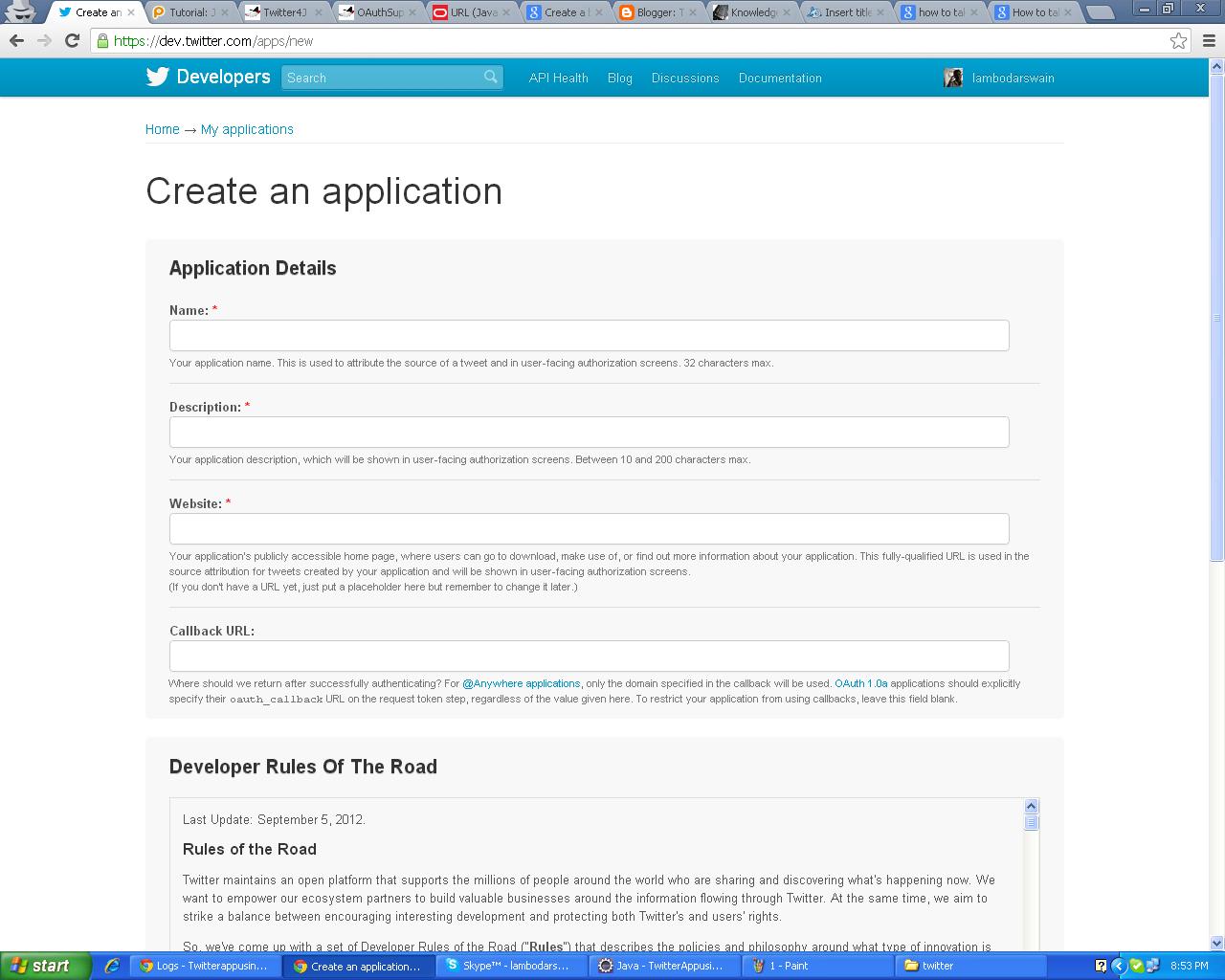
3. Fill-up the details as shown in below screen shot

                                 
    Name:your app name any thing(in my case getRef)
    Description:what is the motto of your app(you can get......)
   Website:your publicly available web site where you are planing to deploy your app.
   callback URL:  Give one hosting environment address because in local host it will not work
   click on create your twitter application

4.Click on create a new application:
  it will give you the following details listed below
      Consumer key
Consumer secret
Request token URL
Authorize URL
Access token URL
Callback URL

5. it's important in callback URL don't give you localhost
    it will not work
    twitter has already remover that option
    so use any live hosting environment and for students use any free cloud server
    for deploy your app by loin for personal use
    eg:-Google app engine,amazon cloud server

    later you will use all the information above while developing your application so note it down.


Example:

Here i use spring-mvc and Google app engine for Deploying this application.In face you can use ioc for injection dependency.

1.i use one Controller to handle all this stuff(GetDataFromTwitter.java) infect you can use servlet also
2.One jsp page to redirect to my app(Welcome.jsp)/optional one
3.Another jsp to ask conformation before redirecting to twitter server(login.jsp)
4.Another one for Displaying the user details. Infect you can  use the user  details/information for further business processing.But in order to complete this blog i display the user information(success.jsp).


Welcome.jsp:(Just for the worm welcome any way this is optional one)

=========================================
<%@ page language="java" contentType="text/html; charset=ISO-8859-1"
    pageEncoding="ISO-8859-1"%>
<!DOCTYPE html PUBLIC "-//W3C//DTD HTML 4.01 Transitional//EN" "http://www.w3.org/TR/html4/loose.dtd">
<html>
<head>
<meta http-equiv="Content-Type" content="text/html; charset=ISO-8859-1">
<title>Insert title here</title>
<style type="text/css">
div#body1{
position:absolute;
top:400px;
left:600px;
}

</style>
</head>
<body>
<div id="header1">
<font color="#0EA5B9" size="4" style="top: 351px;left: 491px;position: absolute;">Click Below Image to Fetch details from Twitter</font>
<div id="body1">
<a href="/requesttwitter"><img src="../image/logo.png"></a>
</div>
</div>
</body>
</body>
</html>
===========================================

GetDataFromTwitter.java:(all business Details)

========================================================
package com.acti.controller;
imports........................;

@Controller
@RequestMapping(value="/")
public class GetDataFromTwitter {

   // This is the consumer key for this application
    private String consumer_key =copy it from your refistred app;

    // This is the consumer secret for this application
    private String consumer_secret = copy it from your registred app;

//Step-1(just for welcome file list)
    @RequestMapping(value="/",method=RequestMethod.GET)
    public String welcome(HttpServletRequest request,HttpServletResponse response) throws     TwitterException{
    return "welcome";
    }
 /Step-2(/from welcome.jsp it will come hear)
@RequestMapping(value="/requesttwitter",method=RequestMethod.GET)
    public String getDetails(HttpServletRequest request,HttpServletResponse response) throws TwitterException{
   
    Twitter twitter = new TwitterFactory().getInstance();
twitter = new TwitterFactory().getInstance();
    twitter.setOAuthConsumer(consumer_key, consumer_secret);
    //AccessToken requestToken=twitter.getOAuthAccessToken();
    RequestToken requestToken= twitter.getOAuthRequestToken();
    String token = requestToken.getToken();
    String tokenSecret = requestToken.getTokenSecret();
    HttpSession session = request.getSession();
    session.setAttribute("token", token);
    session.setAttribute("tokenSecret", tokenSecret);
    session.setAttribute("requesttoken", requestToken);
    System.out.println("Token "+token);
    System.out.println("TokenSecrate "+tokenSecret);
    String authUrl = requestToken.getAuthorizationURL();
    request.setAttribute("authUrl", authUrl);
    System.out.println("url"+authUrl);
    return "login";
   
    }
//Step-3(call back url in my case XXXX.appsport.com/getdata what you have registred curing creation of app)
@RequestMapping(value="/getdata",method=RequestMethod.GET)
public String afterAuthentication(HttpServletRequest request,HttpServletResponse response) throws IOException{
                //create one UserDetails pojo with setter and getter method
UserDetails user_Details=new UserDetails();
PrintWriter out=response.getWriter();
HttpSession session = request.getSession(false);
if(session!=null){
try{
Twitter twitter = new TwitterFactory().getInstance();
twitter.setOAuthConsumer(consumer_key,consumer_secret);
AccessToken accessToken = twitter.getOAuthAccessToken((RequestToken) session.getAttribute("requesttoken"));
twitter.setOAuthAccessToken(accessToken);
//User is a object which contain all the user information details
User user=twitter.verifyCredentials();
user_Details.setUser_Name(user.getName());
System.out.println("seventh");
user_Details.setFrineds_count(user.getListedCount());
user_Details.setUser_Location(user.getLocation());
user_Details.setGet_id(user.getId());
user_Details.setGetLanguage(user.getLang());
user_Details.setUser_url(user.getURL().getPath());
user_Details.setProfile_image(user.getProfileImageURL().getPath());
user_Details.setGettime_Zone(user.getTimeZone());
session.setAttribute("user", user_Details);
}catch (TwitterException twitterException) {
// TODO: handle exception
//your error handling mechanism
}
}
return "sucess";
}
}
=========================================================

login.jsp:( for getting conformation)

=======================================

<%@ page language="java" contentType="text/html; charset=ISO-8859-1"
    pageEncoding="ISO-8859-1"%>
<!DOCTYPE html PUBLIC "-//W3C//DTD HTML 4.01 Transitional//EN" "http://www.w3.org/TR/html4/loose.dtd">
<html>
<head>
<meta http-equiv="Content-Type" content="text/html; charset=ISO-8859-1">
<title>Insert title here</title>

<style type="text/css">
a{
text-decoration : none;
}
a:link {
color: green;
font-weight: bold;
}
a:visited {
color:green;
font-weight: bold;
}
a:hover{
color: red;
font-size: 20px
}
div.common{
font-weight: bold;
position: relative;
left: 500px;
top: 382px;
}
}
/* a:visited{
color:yellow;
} */
</style>

</head>
<body>
<div class="common">
<font color="red" size="4">We need your permission</font><br><br>
&nbsp;&nbsp;&nbsp;&nbsp;&nbsp;&nbsp;&nbsp;&nbsp;
 <a href='<%=request.getAttribute("authUrl") %>'>Click to conform</a>
</div>
</body>
</html>

======================================

success.jsp (to see user details)

==================================

<%@ page language="java" import="com.acti.dto.UserDetails;" contentType="text/html; charset=ISO-8859-1"
    pageEncoding="ISO-8859-1"%>
<!DOCTYPE html PUBLIC "-//W3C//DTD HTML 4.01 Transitional//EN" "http://www.w3.org/TR/html4/loose.dtd">
<html>
<head>
<meta http-equiv="Content-Type" content="text/html; charset=ISO-8859-1">
<title>Insert title here</title>
</head>
<body>
<jsp:useBean id="user" class="com.acti.dto.UserDetails" scope="session"/>
 <table border="0"  cellpadding="0" cellspacing="0" 
height="40%" width="40%">
          <tr>
             <td><FONT SIZE="4" COLOR="#333399">We fetch the Following Information from Twitter</FONT><BR></td>
          </tr>
             <td><B>Name:</B></td>
             <td> <%= user.getUser_Name() %></td>
          </tr>
          <tr>
             <td><B>Id</B></td>
             <td> <%= user.getGet_id() %></td>
          </tr>
           <tr>
             <td><B>Location</B></td>
             <td> <%= user.getUser_Location()%></td>
          </tr>
           <tr>
             <td><B>Language</B></td>
             <td> <%= user.getGetLanguage() %></td>
          </tr>
           <tr>
             <td><B>TimeZone</B></td>
             <td> <%= user.getGettime_Zone()%></td>
          </tr>
           <tr>
             <td><B>Number of Friend</B></td>
             <td> <%= user.getFrineds_count() %></td>
          </tr>
           <tr>
             <td><B>View Profile</B></td>
             <td> <a href="<%= user.getUser_url()%>">click</a></td>
          </tr>
          
</table>
</body>
</html>
===================================


Ok if you fill that this post is really helping you then please don't forgot  to post comment,compliment or suggestion because it will give me more inspiration and energy for further posting.
Finally i will say thank you for your patience


Skype Me™!